Cookie Management
We use cookies to ensure the correct operation of the site, personalize content, and improve the user experience.
Cookie Management
Cookie Settings
Mandatory cookies are always enabled. You can change the settings for other files at any time.
Mandatory Cookies
Always on. These cookies are necessary for the site to function and perform its features. They cannot be disabled. They are usually set in response to actions you take, such as selecting privacy settings, logging in, or filling out forms.
Analytical Cookies
Disabled
These cookies collect information that helps us understand how our site is used and how effective marketing campaigns are. They also allow us to adapt the site to your preferences. You can view the list of analytical cookies used here.
Advertising Cookies
Disabled
These cookies transmit data about your online activity to advertising companies to show you more relevant ads or limit their frequency. This information may be shared with other advertising partners. You can view a list of advertising cookies here.

This site is translated into multiple languages with Multify

Blog

How Multify Works: Reverse Proxy and Server-Side Translation

In this article: why client-side translation scripts can't handle Tilda, how the reverse proxy scheme works via DNS, what it gives for SEO and dynamic content, how forms are translated and currencies are converted on the server side.
A client asks for a website in three languages. You open the Tilda documentation, look at multilingual solutions, and realize: neither Weglot nor built-in tools can handle the catalog and forms. Multify works differently — not through a script on the page, but through DNS. Let's break down exactly how.

The Problem with Client-Side Translation

Most translation services operate on one principle: they insert a JavaScript script into the <head> of the page. The script loads in the browser, intercepts the text on the page, and replaces it with a translation.
This creates several problems.
Search engines see the original. Googlebot requests the page, receives HTML without a script (or with an unexecuted script), and indexes the original language. Language versions are either not indexed at all or are indexed as duplicates. Google officially confirmsthat JavaScript rendering is delayed and not guaranteed.
Dynamic content is not translated. Tilda loads the product catalog via a separate API request. By the time the translation script has already "processed" the page, the products have not yet arrived. The result: the interface is translated, but product names and prices are in the original language.
Forms break. Tilda forms send data through its own domain. The translation script works on your domain and does not have access to Tilda's requests. Field labels, error messages, and post-submission text remain untranslated.

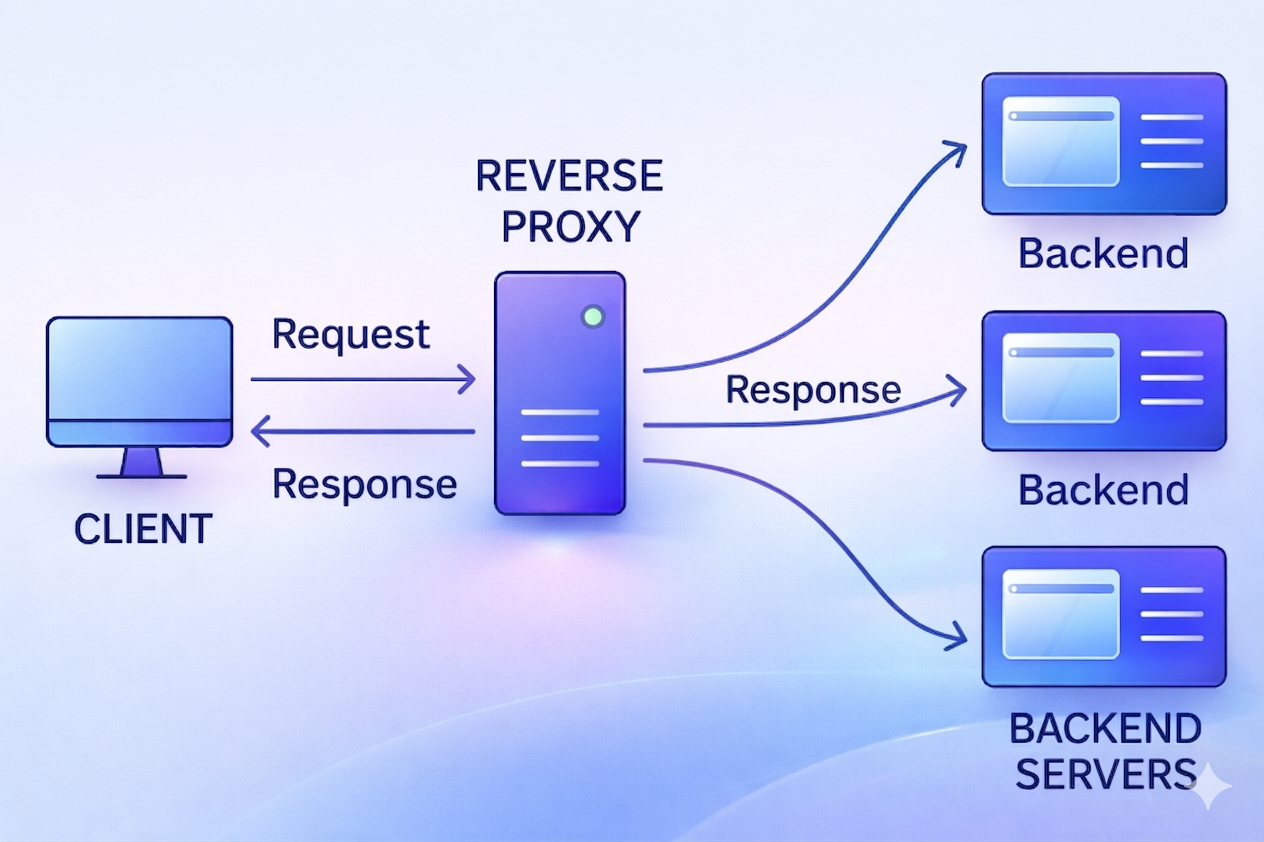
How a Reverse Proxy Works

Multify connects at the DNS level. You change the records so that traffic to language versions goes through Multify servers, not directly to Tilda.
The scheme works like this:
  1. User opens de.yoursite.com (or yoursite.com/de)
  2. DNS sends a request to Multify servers
  3. Multify requests the original page from Tilda
  4. Receives HTML, translates all content on the server
  5. Returns the already translated page to the user
The user sees your domain. Tilda doesn't even know that there is a proxy layer between it and the user. From Tilda's point of view, it's just another request to the site.

Why Server-Side Translation is Important for SEO

When translation occurs on the server before HTML is delivered, the search engine receives an already translated page. This means:
  • Googlebot indexes the German version as a separate URL with German content
  • hreflang attributes in <head> point to the correct language versions
  • The sitemap has separate URLs for each language
  • No duplicate content — each version has its own semantics
Multify automatically generates all these tags. You don't need to manually write hreflang for each page or maintain a separate sitemap. Implementation requirements are described in Google's documentation on localized versions.

What This Means for Dynamic Content

The proxy architecture intercepts not only the initial HTML but also all subsequent content requests. When Tilda loads a product catalog via API, Multify intercepts the server's response and translates it before delivering it to the browser.
In practice, this means:
  • Product names and descriptions are fully translated
  • Prices are converted to the desired currency (more on this below)
  • Dynamically loaded blog articles switch to the desired language
  • Content of widgets and third-party blocks is processed where technically possible
For an agency, this removes the most frequent question from clients with catalogs: "will the products also be translated?"
See how your site looks in another language
Leave a link — we'll show you a demo right on your website.
Submit an application →

Server-side Currency Conversion

A separate function that works on the same logic. Client-side scripts for currency conversion change prices in the browser after the page has already loaded.
The problem is the same: the search engine sees the original price in the original currency. As a result, in a German store, Google indexes prices in rubles. For local SEO, this is a disaster.
Multify converts prices before HTML is delivered. A German user receives a page with prices in euros, and these are the prices Googlebot sees when indexing the German version.

What needs to be done for connection

Nothing needs to be changed on the Tilda side. The website remains as is. All connection comes down to:
  1. Registering with Multify and adding your site
  2. Selecting languages and configuring language versions
  3. Changing DNS records with your registrar
After this, the language versions start working automatically. Translations are cached, and when changes occur on the main site, Multify updates the cache on the next request to the page.

What Happens with Forms

Tilda forms work through a separate Tilda subdomain. A regular client-side script cannot intercept requests to another domain. Multify operates at the network layer and proxies requests, including interaction with the Tilda API.
All form elements are translated: field names, hints, error messages, and text after submission.

Key Points

The reverse proxy architecture solves problems that cannot be eliminated with a client-side script:
  • Search engines receive translated HTML and index language versions correctly
  • Dynamic content (catalog, blog) is translated entirely, not just static markup
  • Forms work completely: fields, errors, confirmations
  • Prices are converted before the page is delivered, not in the browser
  • hreflang, sitemap, and meta tags are generated automatically

FAQ

Do I need to change anything on the Tilda website?

No. The main site remains untouched. Only DNS records are changed — traffic to language versions goes through Multify.

Does this work with Tilda Personal or only Business?

To connect, your domain name is required. If you have your own domain connected to Tilda, the plan does not matter.

How quickly are translations updated when changes are made to the site?

Translations are cached. When content on the main site changes, the cache is updated on the next request to the modified page. For urgent updates, there is a manual cache reset in the Multify panel.

Does the proxy layer affect loading speed?

Multify servers are located in multiple regions, and caching is aggressive. In practice, delays are minimal and not noticeable to the user.
Add multilingual support without site edits
Leave a link — we'll show you a demo right on your website.
See a demo of my website →
Made on
Tilda