

Do you buy goods in China for yuan and sell them in Russia for rubles? Or maybe you sell goods from Europe for euros? The exchange rate changes every day, and prices in the Tilda catalog have to be updated manually. Even worse, when Google indexes your store with prices of $1 instead of the real $100.
This problem is familiar to everyone who trades imported goods and has tried to create an online store on Tilda. In this article, we will analyze why Tilda cannot handle multi-currency "out of the box", why a simple modification for the website does not help solve the problem completely, and what needs to be done to solve this problem correctly.
Contents
Problem #1: Manual price updates kill your time and money
Imagine a typical situation: you have an electronics online store.
- 300 products in the catalog
- Purchases from suppliers in dollars: from $50 to $500 per unit
- The dollar exchange rate changed from 75₽ to 85₽
What needs to be done manually:
- Open an Excel spreadsheet with the price list
- Recalculate 300 items at the new rate
- Add your markup to each item
- Export the updated file in CSV format
- Upload the file to Tilda via catalog import
- Check that everything loaded correctly
This can easily take 2-3 hours of your time.
What if you have 1000 products? Or several currencies at once (dollars, euros, yuan)?
Routine turns into a nightmare.
Tilda does not solve this problem out of the box
Tilda is an excellent builder, but it has a strict limitation: only one currency can be set for the entire project. This currency is specified in the site settings (Settings → Payment Systems → Currency Symbol) and applies globally to all products.
However, it does not have a built-in mechanism for automatically recalculating prices at the exchange rate and converting prices "on the fly" when the page loads.
The only official way is to change prices manually or via CSV file import. Which, as we have already understood, is unrealistic for a business.
Problem #2: A "crutch" with the wrong currency will break your SEO
Some store owners resort to a trick:
- They enter prices in the Tilda catalog in dollars: $100
- But in the site settings, they specify the currency "₽" (to accept payments in rubles through Russian payment systems)
What happens as a result: The website displays "100₽" instead of the actual price.
Then, they install a JavaScript modification on the website that recalculates this price at the current exchange rate directly in the browser. In fact, many do this.
Why doesn't JS conversion solve the problem with search engines?
But here's the catch: search engine bots index the page before JavaScript executes.
Google and Yandex get the original HTML of your page, where the price is indicated as "100₽", and index exactly that. The JavaScript modification for Tilda, which is supposed to recalculate the price to "8 000₽", simply doesn't have time to execute for the bot. Therefore, it's impossible to change the micro-markup on the page using Tilda's modification.
What visitors see on the website:
Samsung Galaxy S24 Smartphone
Price: $1035
What Google and Yandex see in the product card's micro-markup:
<meta itemprop="price" content="100.00">
<meta itemprop="priceCurrency" content="RUB">
As a result, users see in the search results:
Samsung Galaxy S24 Smartphone — 100 ₽
Consequences for Your Business
The downsides here are obvious: even if search engines display product snippets from your site, the price in them will be incorrect — instead of $1038, it shows $1.
Customers click expecting a super discount and leave disappointed after seeing the real price.
Low CTR in organic search — people don't understand the real cost and don't click on your products in search, your offers fall into the area of banner blindness.
How to Check the Problem on Your Site
Google provides a free Rich Results Test tool, which shows exactly how the search robot sees structured data on your site.
Here's how you can check it yourself:
- Open https://search.google.com/test/rich-results
- Paste a specific link to a product card from your catalog (not the main page!)
- Click the "Test URL" button
- Look at the "Detected items" section — what price does Google see?

If you have JS conversion, you will see something like:
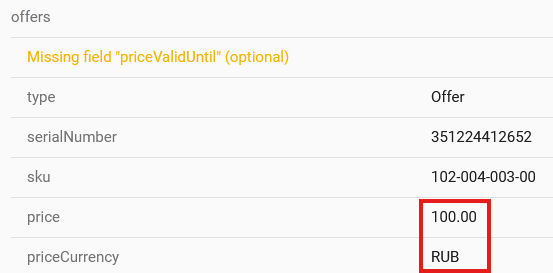
This tool will immediately show the scale of the problem. Check a few product cards — if the prices are incorrect, search engines are indexing your catalog with errors.
Unlike JS modifications for Tilda, Multify converts prices directly in the page's source code, which means that the micro-markup displays the actual amount and rate.
What are the existing solutions?
Option 1: Update prices manually
How it works: Every time the exchange rate changes by 2-5%, the manager opens Excel, recalculates all items, and uploads the updated price list via CSV import to Tilda.
This method has obvious drawbacks:
- Time: 2-3 hours of work with each update = about 10 hours per month
- Human factor: it's easy to forget to update or make a mistake in calculations
- Not scalable: the more products, the longer the process
- You lose money: until you update prices, you either sell at a loss (if the rate has increased) or lose competitiveness (if the rate has decreased)
Cost: ~10 hours of manager's work × $6.45/hour = $64.50/month + nerves and stress
Option 2: Create two projects in Tilda
You can create two separate websites in Tilda: one with prices in dollars, the other in rubles. In this case, there will be no indexing problems, but you will have to maintain two versions of the website instead of one.
This method is technically more sound, but still labor-intensive:
- Content duplication: each product, each page needs to be created twice
- When adding a new product, you will need to add them to both projects
- Changed the description? You will also need to change it in two places
- SEO problems are not excluded: search engines may now consider these pages duplicates, as for a search engine these are two different sites on different domains
Cost: double work on content + double Tilda payment
An Easy Solution Without Compromises: Automatic Currency Conversion with Multify
Multify is a service that solves the multi-currency problem for Tilda correctly, without JavaScript workarounds.
You store prices in the catalog in the base currency
You leave prices in Tilda as they are from the supplier — in yuan, dollars, or euros. This is convenient: your price list matches the catalog on the website, no need to recalculate manually every time.
Multify converts prices on the server side
Connection happens via DNS — you simply change your domain settings, and all traffic starts passing through Multify. No scripts need to be installed on the website.
When a user opens a product card, Multify gets the price from the catalog (for example, $100), converts it at the live currency exchange rate, taking into account your markup and rounding, and returns the ready page with the correct price in rubles.
Key point: conversion happens before the page reaches the user's browser or a search bot. Therefore, Google and Yandex immediately see the correct prices in the micro-markup.
Real case: sneaker store from China
The online store sold branded sneakers, which it purchased in China for yuan. The catalog has about 200 models, with prices ranging from ¥300 to ¥1200.
The owner ordered a JS modification from a programmer to convert prices. On the website, visitors saw the correct prices in rubles, but a problem arose: in Yandex's organic search results, products were displayed with prices like "$5.84" instead of the actual "$102.52".
Because of this, traffic from search came with an expectation of a low price; people saw the real cost and immediately left. Therefore, the conversion from organic search was catastrophically low, and the site did not receive quality traffic, despite good search rankings.
Rich Results Test confirmed: Google saw "$5.84" instead of "$102.52".
After connecting Multify, organic traffic grew by 20% due to correct prices in search snippets, and conversion increased several times over.
The problem with currency conversion on Tilda seems minor until you start calculating the real losses. Manager's working hours spent updating price lists, incorrect prices in search results, disappointed customers leaving — all of this adds up to significant money.
JS modifications seem like a simple solution, but they break SEO. Search engines index prices that are not what people see, and this kills organic traffic. Check your site with the Rich Results Test right now — most likely, Google and Yandex see your products completely differently than you would like.
Multify solves this problem technically correctly: price conversion happens on the server side, which means that both users and search engines will see the correct price.
🚀 Want to translate your entire website, including catalog and posts, into any number of languages in 5 minutes?